Making Emergency Department simulations easier to use
Redesigning a complex simulation tool to help hospital decision-makers explore resource changes and compare projected outcomes.
ALTER interface screens: the Overview dashboard, simulation setup and results comparison
In 2025, I led the design of ALTER, an MSc Human-Computer Interaction project developed in collaboration with Dr. Evan Smyth from the Irish Centre for High-End Computing (ICHEC).
Dr. Evan had developed an agent-based simulation of University Hospital Limerick’s Emergency Department. While the model could explore changes in staffing, patient arrivals and available resources, operating it required command-line instructions and JSON files.
Our challenge was to translate this technically complex system into an accessible interface for non-technical decision-makers.
In 2026, I independently revisited the project to evaluate the original solution, reconsider its scope and redesign the experience around its core purpose: scenario-based resource planning.
My roleLead Product Designer (2025) · Independent Product Designer (2026)Original projectMSc Human-Computer Interaction, UCD · Four-member teamProject partnerDr. Evan Smyth, ICHECTimeline2025 academic project · 2026 independent redesignDeliverablesOriginal high-fidelity prototype · Refocused simulation interface redesignA powerful simulation, but no accessible interface
Dr. Evan’s existing agent-based model was developed to explore patient flow and resource planning at University Hospital Limerick’s Emergency Department.
The accessibility gap
Despite its planning capabilities, the model was operated through technical commands and JSON files, limiting access for non-technical decision-makers.
How the existing simulation workedSimplified modelPatientsClinical staffEquipmentHospital spacesAgent-based simulationModels interactions and resource configurationsPatient flowWaiting timesUtilisationHow might we make the existing Emergency Department simulation accessible to UHL decision-makers so they can explore resource scenarios and understand projected outcomes?
Researching under constraints
Our research combined UHL-specific secondary sources, HCI literature and stakeholder discussions. But accessing the intended users became our biggest research challenge.
The constraintDespite repeated recruitment attempts, we couldn’t secure interviews with UHL staff within the 12-week project timeline.
How we adapted
We recruited healthcare professionals from other Irish hospitals to understand comparable Emergency Department workflows, supported by secondary research and discussions with our project partner.
ED nursesInterviewedED managerInterviewedCHI CrumlinSite visitProxy participants couldn’t fully represent UHL’s operational context. Formal usability testing with intended users was not conducted.
When the solution expanded beyond the original brief
During the original project, our research uncovered challenges beyond resource planning, including fragmented information, manual handovers and difficulties coordinating patient care. While my initial design work focused on the desktop simulation and resource-planning experience, the wider team explored additional opportunities around frontline clinical workflows.
As a result, ALTER evolved into a broader platform with two interfaces: a desktop application for operations managers and a mobile application for nurses.
ALTER mobile app screens for nurses and desktop dashboard for operations managers
Two key issues I identified in 2026
01The product had expanded into a separate clinical workflowThe nurse application introduced patient tracking, QR-based access, handovers, task management and documentation. While these features addressed problems identified during research, they moved beyond the original challenge of making ICHEC’s simulation accessible for resource planning.02Simulation results weren’t designed around comparisonThe desktop interface allowed managers to configure scenarios and inspect projected metrics, but it provided limited support for comparing alternative resource configurations and understanding the trade-offs between them.Results were displayed, but comparisons weren’t prioritised
The simulation screen presented key projected metrics, forecasts and reports. However, results were shown as standalone outputs rather than in direct comparison with a baseline or alternative scenario, making it difficult for managers to evaluate trade-offs between different resource configurations.
ALTER Simulate & Forecast screen: projected impact metrics, a report panel, a capacity forecast chart and historical trends.
Hover or tap a point to explore.
The original project had produced a broader Emergency Department management concept, while its strongest connection to the ICHEC brief remained the simulation experience. Rather than extending the platform further, I decided to revisit the operations manager interface and focus on making scenario exploration and outcome interpretation more effective.
Returning to the original purpose
I decided to narrow the retrospective redesign to the operations manager’s core task: exploring hypothetical resource changes and understanding their possible consequences.
How might we help UHL decision-makers configure resource scenarios, compare projected outcomes and understand operational trade-offs through a focused simulation experience?
A focused simulation workflow
The new direction removes unrelated patient-management workflows, live clinical monitoring and general-purpose AI assistance from the core experience. Instead, it centres on one workflow.
Define starting setupCreate scenariosRun simulationCompare outcomesThe simulation estimates possible outcomes. UHL decision-makers remain responsible for interpreting those results and determining whether any operational changes are appropriate.
Making scenario planning easier to navigate and evaluate
The redesign focuses on helping operations managers define their current ED conditions, explore alternative resource configurations and compare projected outcomes through a clear, structured workflow.
01. Separating the starting setup from scenarios
The redesigned workflow begins with defining the current Emergency Department conditions, including patient arrivals, staffing, equipment and treatment spaces. Users then create separate scenarios to explore hypothetical changes, with each scenario compared against the same starting setup.
Redesigned ALTER starting setup screen with simulation details, a patient arrivals control and an expected arrivals chart
Design decisionSeparate existing conditions from proposed changes to establish a clear reference point for comparison.
02. Making multiple scenarios easier to configure
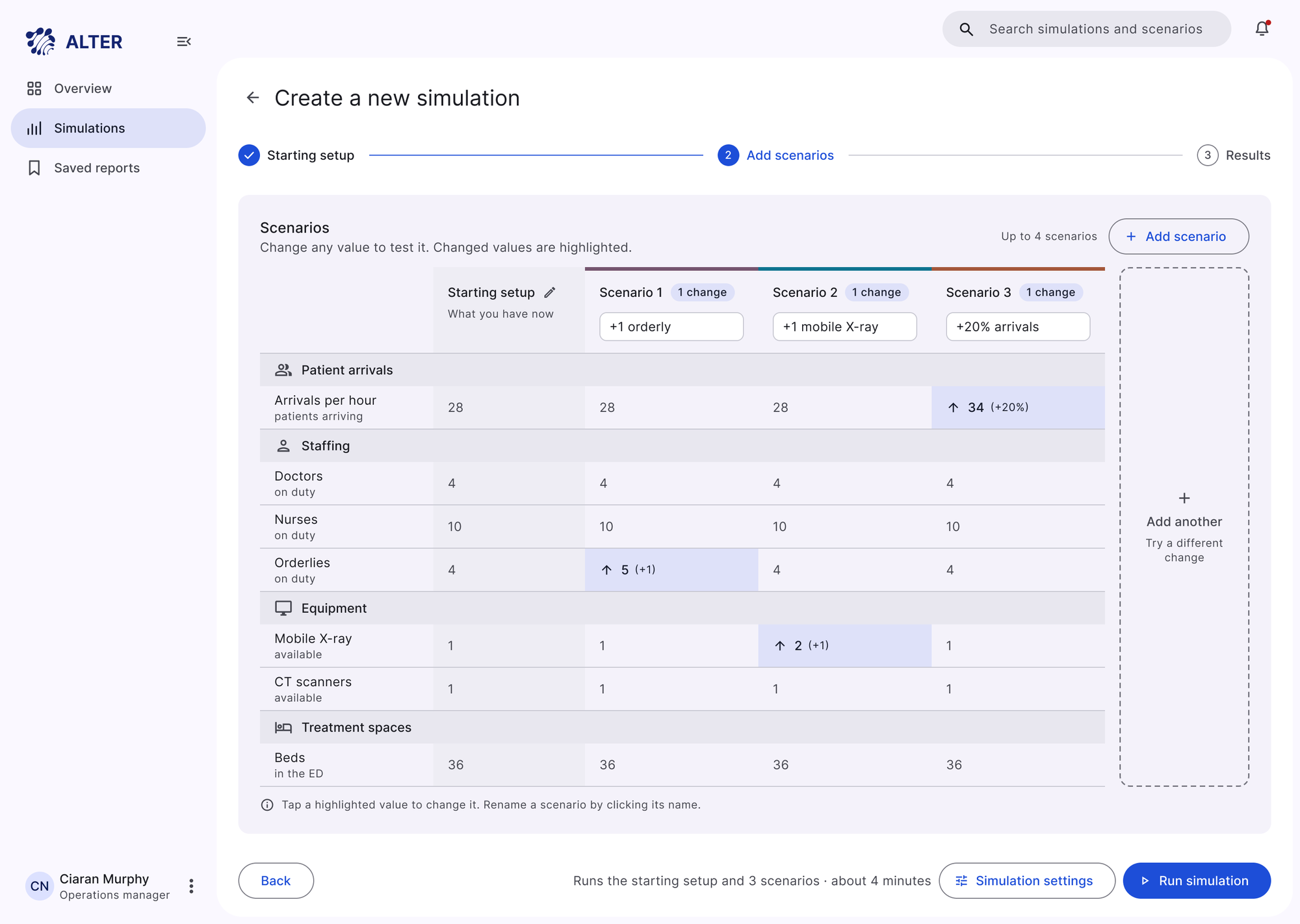
Users can start with common resource changes or create custom scenarios. A comparison matrix displays the starting setup alongside each scenario, highlighting modified values so users can review and adjust multiple configurations before running the simulation.
Redesigned ALTER scenario setup screen with a comparison matrix showing the starting setup beside three scenarios, with changed values highlighted
Design decisionMake differences between scenarios visible during configuration, reducing the need to remember or navigate between individual settings.
03. Making simulation progress transparent
The redesigned progress screen shows which scenarios are completed, running or waiting, along with the overall simulation progress. Users can leave the page while the simulation continues and return when results are ready.
Design decisionProvide clear system feedback without requiring users to continuously monitor the simulation.
04. Making outcomes easier to compare
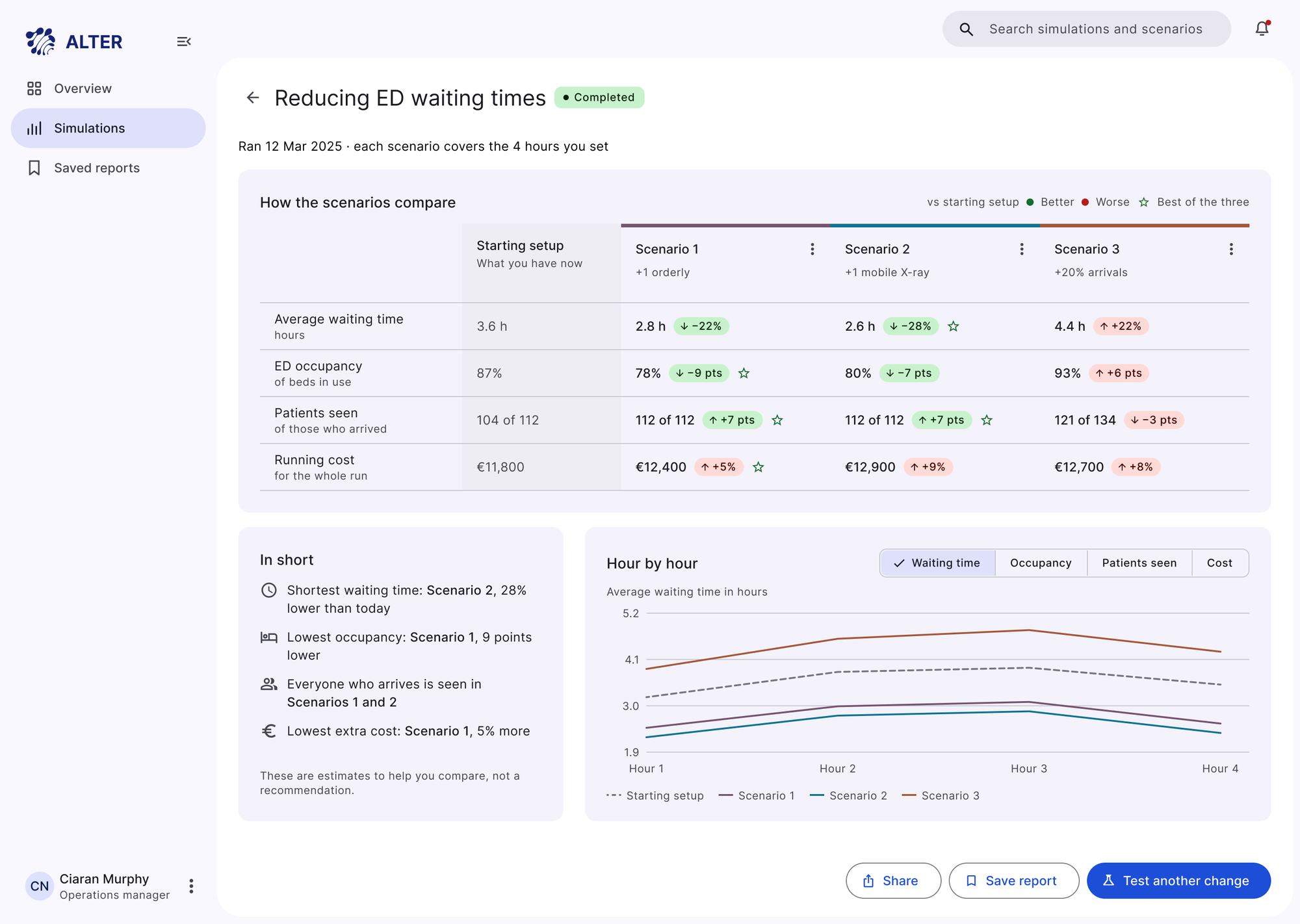
Instead of presenting simulation results as isolated metrics, the redesigned interface compares waiting times, ED occupancy, patients seen and operational costs across scenarios. Differences from the starting setup are highlighted, while charts help users examine changes over the simulation period.
Redesigned ALTER results screen comparing three scenarios against the starting setup, with a summary and an hour-by-hour chart
Design decisionPrioritise side-by-side comparisons to help decision-makers understand the trade-offs between resource configurations.
The experience in action
Learning to define what a product should not do
The redesign explored how a complex simulation system could be organised around a focused decision-making workflow. Separating baseline conditions from hypothetical scenarios, making configurations easier to compare and prioritising differences in the results aimed to help decision-makers evaluate resource planning choices more clearly.
Revisiting the original project also changed how I approached product scope. I recognised that while research can reveal multiple legitimate user needs, not every need should become a feature within the same product.
This is an independent conceptual redesign informed by the original project research and retrospective evaluation. It has not been usability-tested with UHL decision-makers, and its effectiveness has not been validated through live deployment.
Good product design is not about solving every problem uncovered through research. It is about identifying which problems matter most, making deliberate trade-offs and designing around the decisions users need to make.